Learn how Generative Engine Optimization (GEO) works in 2026. Discover simple strategies to get your website cited in ChatGPT, Perplexity, and Google Gemini.
GEO Strategy Overview: What This Guide Covers
Generative Engine Optimization can sound complicated because the technology behind AI search is complicated. The practical side is much simpler: make your website easy to discover, easy to understand, useful to readers, and strong enough to be trusted as a source. The sections below focus on the parts that matter most when you are building an AI search optimization strategy in 2026.
| Section | What readers will learn |
| GEO fundamentals | What GEO means and how it connects with SEO |
| AI retrieval | How AI search systems find and use web sources |
| Practical strategy | How to make content clearer and more useful for AI retrieval |
| Platform tactics | How ChatGPT, Perplexity, and Google differ |
| Technical setup | Crawlers, robots.txt, structured data, and accessibility |
| Measurement | How to track mentions, citations, visibility, referrals, and conversions |
| GEO checklist | A practical process for putting the strategy into action |
Remember, GEO is not a complete replacement for SEO. Google says its existing SEO fundamentals continue to apply to AI Overviews and AI Mode, including making pages accessible to crawlers, indexable, useful, and eligible for normal Search.
How to Optimize for ChatGPT and Copilot
ChatGPT and Microsoft Copilot aren't identical, but they share one useful lesson: your website needs to be accessible to the search systems that may retrieve it. OpenAI officially separates OAI-SearchBot from GPTBot. OAI-SearchBot surfaces websites in ChatGPT search features, while GPTBot crawls content that may be used to improve OpenAI's foundation models. These controls are independent, so allowing one does not automatically mean allowing the other.
Microsoft has also introduced dedicated AI visibility reporting in Bing Webmaster Tools. Its February 10, 2026 announcement described an AI Performance report for seeing when site content is cited across Microsoft Copilot, AI-generated summaries in Bing, and selected partner experiences. On June 16, 2026, Microsoft announced additional preview features for Intents, Topics, Citation Share, and Compare.
That makes the practical workflow much easier: check technical accessibility, improve the content, monitor Bing and Microsoft AI visibility, and separately test your important prompts in ChatGPT.
ChatGPT and Copilot implementation checklist
Before publishing or updating an important page:
- Check whether OAI-SearchBot is blocked.
- Check whether your CDN or firewall is blocking legitimate crawler requests.
- Decide separately whether you want to allow GPTBot.
- Make sure the important content is available without login or interaction.
- Use clear page titles and descriptive headings.
- Answer the main question near the beginning.
- Add original examples and supporting evidence.
- Monitor Bing Webmaster Tools for AI visibility where available.
- Test important branded and non-branded prompts manually.
A simple robots.txt review might look like this:
User-agent: OAI-SearchBot
Allow: /
User-agent: GPTBot
Allow: /
This is only an example. Do not copy it unthinkingly into a live website. Your GPTBot rule should reflect your own content and licensing decision.
While websites that opt out of OAI-SearchBot are excluded from ChatGPT's search results, they may still be featured as navigational links. OpenAI also recommends allowing requests from its published IP ranges when configuring access controls.
Official sources: OpenAI Crawlers documentation · Bing AI Performance announcement
How to Optimise for Perplexity
Perplexity uses its own search and crawling infrastructure, so treat it as a separate visibility channel rather than assuming Google rankings automatically translate into Perplexity citations. Perplexity describes PerplexityBot as its search crawler and says it follows explicit limits in robots.txt. Its published technical material also explains that its search infrastructure considers document relevance, freshness, completeness, and content understanding.
For a website owner, the first step is straightforward: check that robots.txt, a WAF, CDN rules, or server security settings are not unnecessarily blocking Perplexity's crawler.
A simple review can include:
User-agent: PerplexityBot
Allow: /
Again, this is an example, not a universal configuration. Review your own access policy before changing production files.
The second step is content quality. If your article answers a question with a clear definition, supporting facts, examples, and named sources, it gives an answer engine more useful material to work with. That does not guarantee a citation, but it makes the page much more useful as a source.
Perplexity checklist
For important pages:
- Check robots.txt.
- Check server logs for crawler access.
- Check whether the page returns a normal 200 response.
- Put the main answer near the top.
- Use natural question-based headings where appropriate.
- Add trustworthy sources to important claims.
- Add original examples instead of rewriting competitors.
- Keep changing information current.
- Test 20–50 important prompts.
- Record whether your site is mentioned or cited.
Important 2026 note: FAQPage structured data should not be presented as a guaranteed Perplexity ranking or citation tactic. It can describe genuine FAQ content, but there is no first-party evidence showing that adding FAQPage schema guarantees Perplexity citations.
Official source: Perplexity crawler guidance
How to Optimize for Google AI Overviews and Gemini
Google's current guidance is especially useful because it removes some of the confusion around GEO. Google says there are no additional technical requirements or special schema requirements specifically for appearing in AI Overviews or AI Mode. The basic requirements still matter: pages should be crawlable, indexable, eligible for Search, and contain helpful information.
Google also explains that its AI search experiences can use techniques such as query fan-out to explore related searches and gather supporting information. That means a page should cover the real topic rather than repeating one keyword dozens of times.
A practical Google AI search checklist
For each important page:
- Make sure Googlebot can crawl it.
- Make sure the page can be indexed.
- Use a clear title and logical headings.
- Answer the main question early.
- Support important claims with reliable sources.
- Include original information where possible.
- Keep author and organisation information clear.
- Use relevant structured data correctly.
- Avoid creating pages to target every tiny query variation.
- Check Search Console for generative AI visibility where available.
Google's current documentation also says publishers do not need to create llms.txt for Google Search. Google clarified in June 2026 that such files aren't needed for Google Search and don't provide a positive or negative ranking effect there.
Google-Extended: what it actually controls
Google-Extended is another area where GEO articles often oversimplify things.
Google says Google-Extended is a separate robots.txt control that publishers can use to manage whether content crawled by Google can be used for future Gemini model training and for grounding in certain Gemini and Vertex AI experiences. Google also states that Google-Extended does not affect inclusion in Google Search and is not a Google Search ranking signal.
So do not write that blocking Google-Extended automatically blocks your website from Google AI Overviews. That would be inaccurate.
Official sources: Google AI features documentation · Google generative AI optimization guidance · Google crawler documentation
Technical GEO Checklist
Before improving AI citations, make sure the technical foundation is healthy.
Complete robots.txt review
Check every important crawler separately:
| Crawler | Main purpose | What to check |
| Googlebot | Google Search crawling | Important pages are accessible |
| OAI-SearchBot | ChatGPT Search | Not unintentionally blocked |
| GPTBot | Potential training crawl | Decide according to your policy |
| PerplexityBot | Perplexity search crawling | Not blocked by robots/WAF |
| Google-Extended | Gemini-related controls | Understand its separate purpose |
Google explains that robots.txt controls crawling, while Google-Extended is specifically a product token for certain Gemini-related use and does not affect Google Search rankings.
Do not stop at robots.txt. Test the complete path:
Crawler → DNS → CDN → WAF → Server → HTML → Content
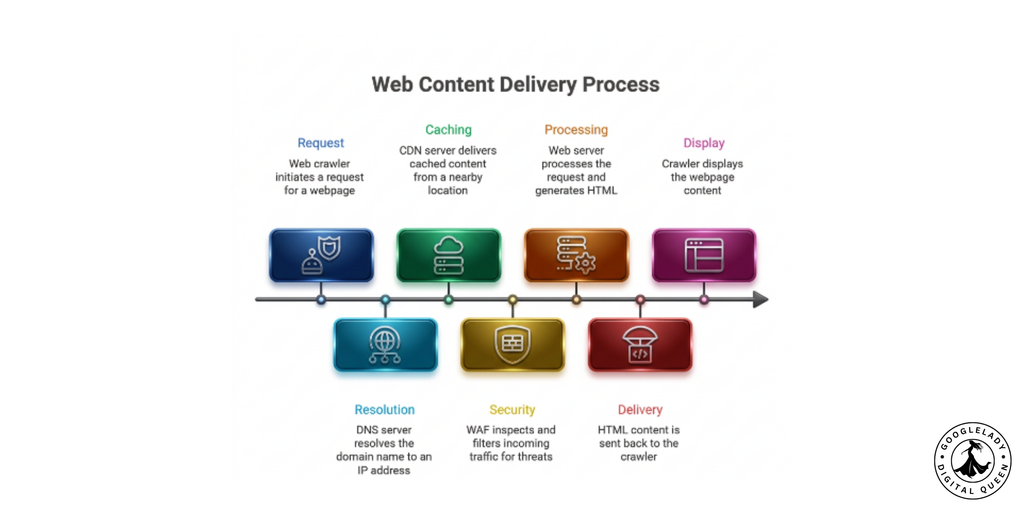
If a crawler is allowed by robots.txt but your WAF returns a 403 response, the practical result is still a blocked page.
Structured Data Example for Article and Author
Structured data should describe the page accurately. It should not be treated as a secret GEO SEO shortcut.
A simple Article implementation can identify the article, author, publisher, and dates:
<script type="application/ld+json">
{
"@context": "https://schema.org",
"@type": "Article",
"headline": "The Complete Guide to Generative Engine Optimisation",
"author": {
"@type": "Person",
"name": "Author Name",
"url": "https://example.com/author/author-name"
},
"publisher": {
"@type": "Organization",
"name": "Example Company",
"url": "https://example.com"
},
"datePublished": "2026-09-28",
"dateModified": "2026-09-28"
}
</script>
The actual values should match the visible page. Do not use a fake author, inaccurate publication date, or organisation name that does not represent the real business.
Google says structured data helps it understand page content, but following structured-data requirements does not guarantee a particular search appearance.
For an author-focused site, also create a useful author page explaining the person's experience and relevant expertise. That is much stronger than simply putting “SEO Expert” beneath an article.
GEO Content Brief Template
Before writing an article, create a short GEO content brief.
Primary question:
What exact question should this page answer?
Search intent:
Informational/commercial / comparison / transactional/local
Direct answer:
Write a 40–80 word answer in plain English.
Supporting questions:
List 5–10 related questions a real reader might ask.
Original information:
What can this article add that competitors do not?
Evidence:
Which claims need first-party documentation, research, statistics, or expert sources?
Author:
Who is writing it, and why are they qualified?
Examples:
Which real situations can make the explanation easier?
Entities:
What companies, products, people, technologies, or concepts need clear identification?
Internal links:
Which relevant pages on the website should be connected?
External sources:
Which authoritative sources support the important claims?
Update requirement:
Which facts could become outdated?
This brief helps prevent the common problem of producing a 2,500-word article that technically covers a topic but never gives the reader a clear answer.
GEO Prompt-Tracking Spreadsheet Template
A simple spreadsheet can turn GEO measurement into a repeatable process.
| Date | Prompt | Platform | Brand mentioned? | Website cited? | Cited URL | Competitors cited | Referral? |
| Sep 2026 | What is GEO? | ChatGPT | Yes | Yes | /geo-guide | Brand B | No |
| Sep 2026 | Best GEO tools | Perplexity | No | No | — | Brand C | No |
| Sep 2026 | How to optimize for AI search? | Yes | Yes | /ai-seo | Brand B | Yes |
Keep the prompt wording consistent during each measurement cycle. If you completely change the questions every month, it becomes difficult to determine whether visibility actually improved.
For larger websites, divide prompts into groups such as:
- Brand prompts
- Product prompts
- Service prompts
- Problem-solving prompts
- Comparison prompts
- Local prompts
- Informational prompts
The goal is not to create a fake “AI ranking position.” This process aims to analyse your brand's presence, map cited content, benchmark competitors, and pinpoint the topics driving visibility.
Monthly GEO Audit Workflow
A monthly audit does not need to take weeks.
Week 1: Technical check
Review:
- robots.txt
- XML sitemap
- crawl errors
- server response codes
- important redirects
- canonical tags
- indexing
- JavaScript-rendered content
- WAF/CDN blocking
Week 2: Content check
Choose your most important 10–20 pages and ask:
- Does the page answer its main question quickly?
- Are the facts still correct?
- Are the sources still available?
- Is the author information accurate?
- Are examples still relevant?
- Are there outdated statistics?
- Are internal links useful?
Week 3: AI visibility check
Run the same prompt set across the platforms that matter to your business.
Record:
- brand mentions
- website citations
- cited URLs
- competitors mentioned
- questions where the brand is absent
- changes from the previous month
Week 4: Improvement
Choose the pages with the biggest opportunities.
Do not rewrite everything.
If one page is already receiving citations, improve it carefully. If another page has strong organic visibility but never appears in relevant AI answers, investigate its content depth, evidence, clarity, and technical accessibility.
GA4 Channel-Group Example for AI Referrals
GA4 can help you understand what happens after someone reaches your site from an AI platform.
A simple AI referral grouping can include known referral domains from platforms that send traffic to your site.
For example:
| Channel | Example source | Suggested group |
| AI Referral | ChatGPT-related referral | AI Search |
| AI Referral | Perplexity | AI Search |
| AI Referral | Copilot/Bing | AI Search |
| Organic Search | Organic Search | |
| Organic Search | Bing | Organic Search |
Do not assume every AI visit will always appear under one clean referral source. Attribution can change depending on browser behaviour, redirects, privacy settings, and how a platform opens a link.
For that reason, compare GA4 referral data with your AI visibility records, rather than treating analytics as the complete picture.
The most useful metrics are:
- AI-referred sessions
- engaged sessions
- landing pages
- conversions
- revenue or leads
- assisted conversions
- new users
- returning users
The business question is simple: Are AI citations producing useful visitors?
GEO Content Optimisation Checklist
Use this checklist before publishing an important page:
- Define the main question.
- Answer it near the beginning.
- Use clear, descriptive headings.
- Add natural question-based sections where useful.
- Include original examples, research, data, or experience.
- Cite important factual claims.
- Use trustworthy first-party sources where available.
- Add a real author and useful author information.
- Keep organisation information consistent.
- Check internal links.
- Check robots.txt.
- Check crawler access through CDN/WAF rules.
- Check server response codes.
- Validate structured data.
- Make sure important content is accessible in HTML.
- Check the page on mobile.
- Track the page in your prompt set.
- Monitor AI mentions and citations.
- Track AI referral traffic.
- Track conversions.
- Review time-sensitive information regularly.
This is the practical GEO checklist to keep beside your normal SEO publishing process. It does not guarantee an AI citation, but it covers the areas you can actually control.
Best GEO Tools for Monitoring AI Visibility
No single tool can show every AI citation across every platform. A practical 2026 setup is therefore a combination of first-party tools and your own prompt tracking.
Google Search Console
Google's Generative AI performance report is now an important source for Google Search visibility. Google states that, as of August 31, 2026, it rolled out the report to websites worldwide. It reports impressions from generative AI features on Google Search, including AI Overviews and AI Mode, and lets site owners examine pages, countries, devices, and dates.
Google also provides a separate control for managing whether a site's links and content can appear in Search generative AI features. Google says it rolled out this control worldwide on August 31, 2026.
Google Search Console — Generative AI performance report
Bing Webmaster Tools
Bing Webmaster Tools is useful for websites that care about Microsoft AI visibility. Microsoft launched its AI Performance report in public preview on February 10, 2026, followed by additional AI Visibility Insights such as Citation Share, Intents, Topics, and Compare on June 16, 2026.
Bing AI Performance documentation and announcements
GA4
Use GA4 for the part that AI visibility reports cannot fully answer: what visitors do after clicking your citation.
Track landing pages, engagement, leads, sales, and other business conversions.
Server logs
Server logs are particularly useful when checking whether crawlers are actually reaching your website. Robots.txt says what you permit; logs can show what is actually happening.
Your own prompt tracker
For ChatGPT, Perplexity, Gemini, and other systems, maintain a fixed prompt set and test it consistently. Record the exact prompt, date, platform, mention, citation, cited URL, and competitors appearing in the answer.
This combination is more useful than relying on one “GEO score.”
How Long Does GEO Take to Work?
There is no reliable universal timeframe for GEO.
A technical change such as fixing a blocked crawler can have a relatively direct effect on crawl accessibility, but becoming a frequently cited source is different. AI systems need to discover and process content, and citation patterns can change with queries, sources, indexes, models, and product updates.
That means it is better to measure GEO in stages:
Stage 1: Is the page accessible?
Stage 2: Is it indexed or discoverable?
Stage 3: Does it appear for relevant searches or AI prompts?
Stage 4: Is the website or page cited?
Stage 5: Do those citations generate useful traffic?
Stage 6: Do those visitors convert?
Do not promise clients that GEO will produce citations in 30, 60, or 90 days. The major platforms do not support a fixed timeline.
A better reporting statement is: “We will establish a baseline, improve the technical and content signals we can control, and measure changes in AI visibility over time.”
Can Small Websites Get Cited by AI Search Engines?
Yes. A small website does not automatically need to be a huge publisher to be useful as a source.
The key question is whether the website contains information that answers a specific question better or more directly than the available alternatives. A small specialist company might have first-hand product experience, original research, local expertise, customer data, technical documentation, or a detailed case study that a much larger general website lacks.
Perplexity's own technical discussion describes its search infrastructure as considering factors such as relevance, freshness, content understanding, and authoritative domains.
For a small business, this creates a practical opportunity.
Instead of publishing 100 generic AI-generated articles, publish 20 genuinely useful resources based on real customer questions. Include real examples. Explain how you reached conclusions. Add author information. Show original photographs, measurements, tests, processes, or case results where appropriate. Link to reliable external evidence.
A small site cannot control whether an AI system chooses its content. But it can control whether the content contains something worth citing.
Important 2026 Source Verification Notes
The following platform claims have been checked against first-party documentation available on September 28, 2026:
| Claim | Verification | First-party source |
| Google Search Console generative AI performance report rolled out worldwide August 31, 2026 | Confirmed | Google Search Console Help |
| Report covers Google AI Overviews and AI Mode | Confirmed | Google Search Console Help |
| Google Search generative AI control rolled out worldwide August 31, 2026 | Confirmed | Google Search Console Help |
| FAQ rich results stopped appearing May 7, 2026 | Confirmed | Google Search documentation/update |
| OAI-SearchBot is used for ChatGPT Search | Confirmed | OpenAI crawler documentation |
| GPTBot is separate from OAI-SearchBot | Confirmed | OpenAI crawler documentation |
| Google-Extended controls certain Gemini-related training/grounding use | Confirmed | Google crawling documentation |
| Google-Extended does not affect Google Search ranking/inclusion | Confirmed | Google crawling documentation |
| Bing AI Performance launched in public preview February 10, 2026 | Confirmed | Microsoft Bing Webmaster Blog |
| Bing added Citation Share, Intents, Topics, and Compare in June 2026 | Confirmed | Microsoft Bing Blog, June 16, 2026 |
| PerplexityBot is Perplexity's search crawler and follows robots.txt limits | Confirmed | Perplexity technical material |
Last verified: September 28, 2026.
One wording change is intentional: claims such as “40–80 words guarantees better ChatGPT citations,” “GEO takes 60–90 days,” or “FAQPage schema improves Perplexity rankings” should not be presented as official platform requirements. They are practical recommendations at most, not documented ranking rules.
FAQ Rich Results: Important 2026 Update
Google's FAQ search treatment changed in 2026. Google announced that the FAQ rich-result feature would no longer appear in Google Search starting May 7, 2026, and its Search documentation updates subsequently recorded the removal of the FAQ rich-result documentation. Google Search Console's data-anomaly documentation also states that FAQ rich results stopped appearing from May 7, 2026.
This does not mean that FAQs are useless.
Frequently asked questions can still be excellent content because they answer real user concerns. You can also use appropriate structured data when it accurately describes visible content and follows Google's guidelines. The important distinction is that FAQ content and FAQ rich-result eligibility are not the same thing.
So the 2026 recommendation should be:
Write useful FAQs for people first. Use structured data accurately when appropriate, but do not promise a Google FAQ rich result simply because FAQPage markup has been added.
Official source: Google Search Central — Latest documentation updates